
Mailinois
Follow every message through your Postfix relays.
Mailinois reads Postfix’s logs and follows each message by queue ID, from the app that handed it over to every recipient’s final answer. One Go binary on your own servers, never in the delivery path.
Postfix stays the mail server
Mailinois reads Postfix’s logs over syslog, follows every message by queue ID from the app that handed it over to each recipient’s final answer, and serves a dashboard of what happened: deliveries, deferrals, bounces, rejections and the queue.
It is never in the delivery path. If Mailinois or its database goes down, Postfix keeps accepting, queueing and delivering mail. (The optional milter for captures is set to accept mail whenever Mailinois is unreachable, so that holds with captures on too.)
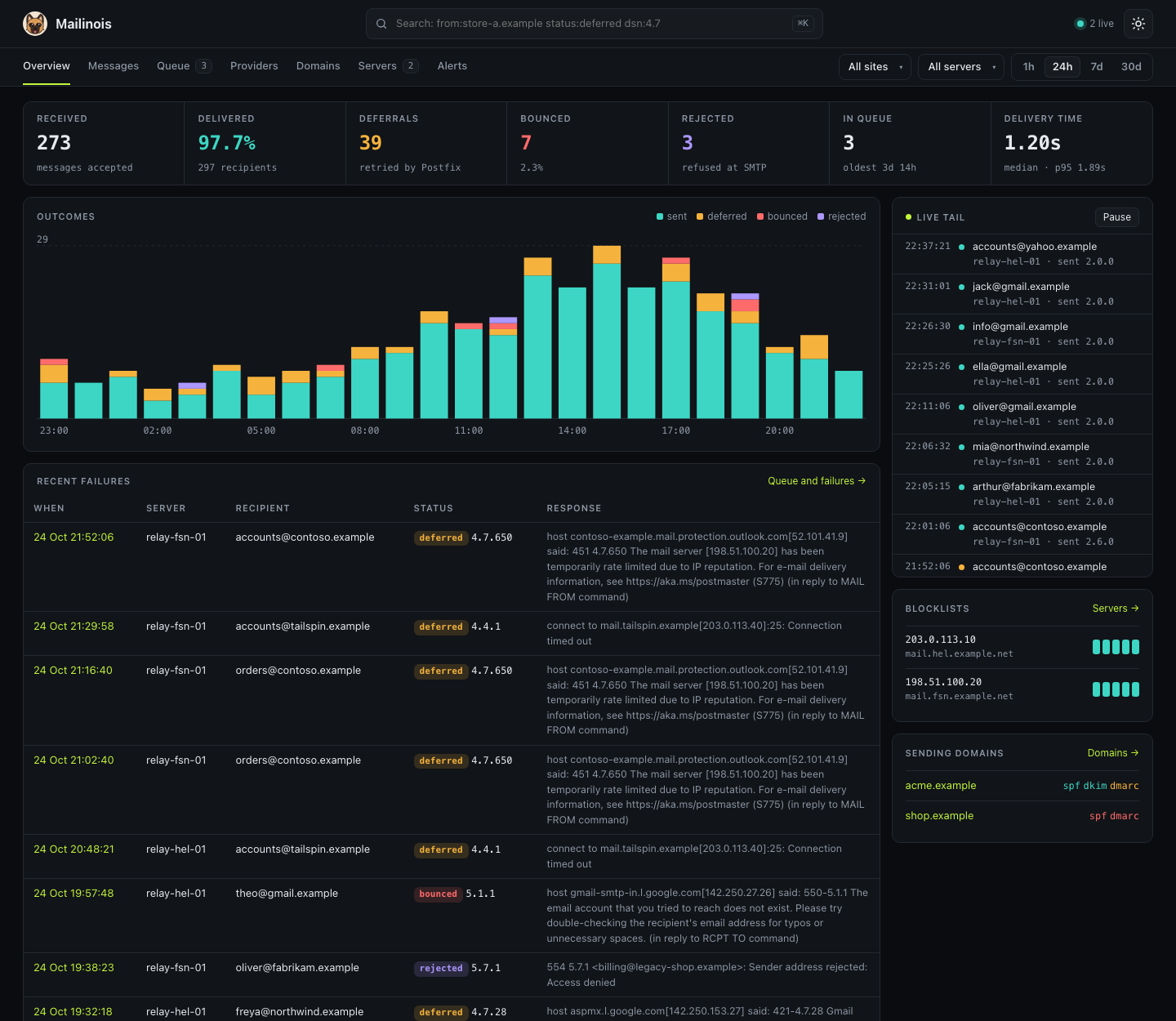
What you get
Every message’s timeline
Each message by queue ID: the client that handed it over, its Message-ID, every delivery attempt and each recipient’s final answer, in order.
Deferrals and bounces, explained
Grouped by provider (Google, Microsoft, Yahoo, Apple and everyone else) and set against the previous period.
The queue
What is waiting on each server, and why each message is still there.
Many servers, many sites
Any number of Postfix servers and sending domains in one place. Look at one site or server alone, or all of them together.
A search language
from:store-a.example status:deferred dsn:4.7 after:2dIn the ⌘K box and on the Messages page.
Headers and bodies, if you want them
Optional capture through a Postfix milter: headers only, or the whole message, with its own retention.
SPF, DKIM and DMARC
SPF evaluated against every sending IP, DKIM keys for every selector seen, and each domain’s DMARC policy and alignment.
Reverse DNS and blocklists
Forward-confirmed reverse DNS and blocklist lookups for each sending IP, IPv4 and IPv6.
Alerts to webhooks
Bounce and deferral rates, the queue, blocklistings, silent servers and failing DNS, sent as JSON or to Slack or Discord.
A REST API
JSON under /api/v1, with read-only tokens and the same search language.
Prometheus metrics
Queue depth, delivery outcomes and blocklist listings per server, plus Mailinois’s own health.
One-off reports
mailinois report -q "to:ann@gmail.example" /var/log/mail.logNo server needed: point mailinois report at a mail log and get one HTML, Markdown or JSON file with every message’s story. For the customer who says the email never came.
Inspect a node
mailinois inspect /var/logSSH in and run mailinois inspect: the overview, every message’s story, Postfix’s live queue and new deliveries in the terminal. Read-only, and nothing is kept when you quit.
One binary
A single Go binary with SQLite built in, PostgreSQL if you would rather. Run it under systemd, in Docker or on Kubernetes.
How it fits together
Each server shows up under its own hostname when its first line arrives, so adding a relay is pointing its rsyslog at Mailinois. How Mailinois follows a message.
Self-host in a minute
Run it with Docker Compose. The SQLite database lives on the volume.
services:  mailinois:    image: ghcr.io/samjuk/mailinois    restart: unless-stopped    environment:      MAILINOIS_DATABASE_URL: sqlite:/data/mailinois.db    ports:      - "7480:7480"       # dashboard and REST API      - "5514:5514"       # syslog from your Postfix hosts, TCP      - "5514:5514/udp"   # and UDP    volumes:      - mailinois-data:/data
volumes:  mailinois-data:
Then point each Postfix host’s rsyslog at it. The file ships in the repository and leaves Postfix’s own log alone.
sudo cp deploy/rsyslog/mailinois.conf /etc/rsyslog.d/# set target="…" in that file to Mailinois's address, then:sudo systemctl restart rsyslogOpen http://<your server>:7480 and the first messages appear as Postfix logs them. Prefer a binary? mailinois serve does the same, with SQLite in the working directory, andInstalling has a systemd unit and Kubernetes manifests. Postfix somewhere else, or only journald? Sending logs covers the agent, Vector and Fluent Bit.
To look around first, try the local preview with made-up traffic from thequick start. There is no login in this example, so read Authentication before the dashboard leaves a private network.
Built for privacy
Metadata by default
Mailinois keeps what Postfix logs: addresses, queue IDs, Message-IDs, SMTP responses and the lines themselves. It sees no message bodies unless you turn captures on.
Captures are opt-in
Headers only, or whole messages, through the milter. Captures have their own retention, seven days unless you change it.
On your own infrastructure
One binary and one database on your servers. There is no hosted service in between.